3) Download latest Redmi 5 Plus China Stable ROM (Fastboot) – extract into a specific folder Refer below link:- global rom download
4) Install them & restart your PC in ‘disable driver signature enforcement’
5) Open up your back cover (Scariest part) Use TEST POINT method to plug in my phone & detected as QUALCOMM HS-USB QDLoader 9008 under Ports Refer below:-
You may need to try several times**
6) After detected, open MiFlashTool, click refresh button & a COM number with a device detected
7) Select the folder where ROM being extracted, click FLASH & wait for firmware loaded into the phone.
Once done, power on the phone & all DONE, Red 5 Plus booted into original China ROM.
If want to install Global ROM, apply unlock permission legally & binding will surely be successful. But have to wait 360 hours to get the phone unlock.
Once unlocked, use MiFlashTool to install latest Global ROM (DO NOT use test point method , plug into USB port as normal) in FASTBOOT mode.
Redmi 5 locked bootloader unbrick
Finally able to unbrick 😄
Here's my summary:-
1) Download Qualcomm HS-USB driver
2) Download MiFlashTool (I tried several version)
3) Download latest Redmi 5 Global Stable ROM (Fastboot) - extract into a specific folder
Refer below link:-
Download Global ROM Here
4) Install them & restart your PC in 'disable driver signature enforcement'
5) 😱 Open up your back cover (Scariest part)
Use TEST POINT method to plug in my phone & detected as QUALCOMM HS-USB QDLoader 9008 under Ports
You may need to try several times**
6) After detected, open MiFlashTool, click refresh button & a COM number with a device detected
7) Select the folder where ROM being extracted, click FLASH & wait for firmware loaded into the phone.
Once done, power on the phone & all DONE, Red 5 booted into original China ROM.
If want to install Global ROM, apply unlock permission legally & binding will surely be successful. But have to wait 360 hours to get the phone unlock.
Once unlocked, use MiFlashTool to install latest Global ROM
(DO NOT use test point method 😬, plug into USB port as normal) in FASTBOOT mode.
You may need to try several times**
6) After detected, open MiFlashTool, click refresh button & a COM number with a device detected
7) Select the folder where ROM being extracted, click FLASH & wait for firmware loaded into the phone.
Once done, power on the phone & all DONE, Red 5 Plus booted into original China ROM.
If want to install Global ROM, apply unlock permission legally & binding will surely be successful. But have to wait 360 hours to get the phone unlock.
Once unlocked, use MiFlashTool to install latest Global ROM (DO NOT use test point method 😬, plug into USB port as normal) in FASTBOOT mode.
😛 Hope it's clear enough for everyone to understand.
this firmware is Mi A2 Lite Global stock rom
MIUI version : 9.6.4.0.ODLMIFF
Android version : 8.1
official rom
file size : 1.48Gb
Download Firmware (1.48GB)
this firmware is Mi 8 global stock rom
dead fix
MIUI version : 9.5.13.0
android version : 8.1
file size : 2.4Gb
fastboot flash file
Download Firmware (2.4GB)
this firmware is xiaomi redmi note 5a prime global stock rom
miui version : 9.1.2.0
android version : 7.1
file size : 1.64 Gb
download link mediafire free
Download Firmware (1.64GB)
this firmware is xiaomi redmi note 5a global stock rom
miui version : 9.1.2.0
android version : 7.1
file size : 1.64 Gb
download link mediafire free
Download Firmware (1.64GB)
this firmware is xiaomi mi mix 2 stock global rom
miui version : 9.1.1.0
Android version : 7.1 global
file size : 2Gb
download link mediafire free
Download Firmware (2GB)
this firmware is xiaomi redmi note 5 pro china stock rom
miui version : 9.2.7
Android version : 7.1
file size : 2.21 Gb
download link mediafire free
Download Firmware (2.21GB)
this firmware is xiaomi redmi note 5 china stock rom
miui version : 9.5.4
Android version : 7.1
file size : 1.99 Gb
download link mediafire free
Download Firmware (1.99GB)
This firmware is xiaomi HM Note1W china stock rom
MT6592
Android Version : 4.2.2
file size : 976.81Mb
download link mediafire free
Download Firmware (976.81GB)
this firmware is xiaomi mi mix 2s china stock rom
MIUI Version : 9.5.15
Android Version : 8.0
file size : 2.48Gb
download link mediafire free
Download Firmware (2.48GB)
this firmware is xiaomi redmi S2 china stock rom
MIUI version : 9.5.6
Android Version : 8.1
file size : 1.48Gb
download link mediafire free
Download Firmware (1.84GB)


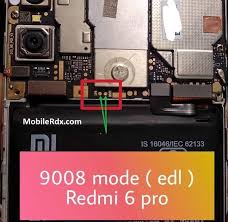


 Open up your back cover (Scariest part)

 , plug into USB port as normal) in FASTBOOT mode.