


BB_CPU_NME : [MediaTek] MT6580_S00
BB_CPU_EXT : 0xCA00 , 0x8A00 , 0x0000
Processing BROM stage
Settings for BROM configured!
SecCfgVal : 0x00000000
BromVer : 0x00FF
BLVersion : 0x0001
PreLoader : Active [ Boot with PL ]
BootLdrSS : NORMAL with SPRELOADER
Processing DA stage
DA Select done, will use MTK_AllInOne_DA_v5.1624.16.07
Sending and initialize DA ...
Running DA ver.4.2 on BBID : 0x94
NAND Flash : NOT INSTALLED
eMMC Flash : 8801034E4361726420263C54326033DB
Initialize Memory ...
DRAM already initialized by Preloader
DAgent sent , init HW now
eMMC FlashIC initialized
[eMMC] : FLASH_VEN : 0x88 , OEM : 0103
[eMMC] : FLASH_INF : [FORESEE] , draC
[eMMC] : FLASH_CID : 8801034E4361726420263C54326033DB
[eMMC] : FLASH_BRT : 0x00400000 , 0x00400000 , 0x00400000
[eMMC] : FLASH_LEN : 0x00000001CE100000
[eMMC] : FLASH_UCP : 7393 MiB [eMMC 8 GiB]
DEV RID : 0x0D22E228D2D7E5EF083D4C160B1A98F0
INT RAM : 0x00020000
EXT RAM : 0x40000000 [1 GiB]
BOOT TYPE : EMMC_FLASH_BOOT
SOC VERIFY : C1
Boot Ok!
Reading Flash Content now ...
Brand : alps
ProdName : full_gxq6580_weg_l
ProdModel : gxq6580_we_l
Device : gxq6580_weg_l
AndroidVer: 5.1
MTKxCPU : MT6580
MTKxPRJ : ALPS.L1.MP6.V2_GXQ6580.WEG.L_P62
[Read Ok] : preloader_gxq6580_weg_l.bin
[Read Ok] : lk.bin
[Read Ok] : boot.img
[Read Ok] : recovery.img
[Read Ok] : logo.bin
[Read Ok] : secro.img
[Read Ok] : system.img
[Read Ok] : cache.img
[Read Ok] : userdata.img
[ScatCFG] : MT6580 / V1.1.2 / gxq6580_weg_l / EMMC
Android Info saved
MAUI Meta DB saved
HWConfig Info saved
FW Size : 1314 MiB
Scatter saved to :
Frimware Downlaod Here
rar password : gxq6580
Samsung A9 Clone Firmware
By yuzay
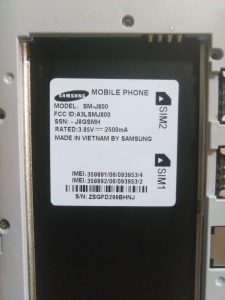
samsung j800 clone mt6572 fix 100% testing firmware
[Read Ok] : MBR
[Read Ok] : EBR1
[Read Ok] : lk.bin
[Read Ok] : boot.img
[Read Ok] : recovery.img
[Read Ok] : secro.img
[Read Ok] : logo.bin
[Read Ok] : system.img
[Read Ok] : cache.img
[Read Ok] : userdata.img
[ScatCFG] : MT6572 / V1.1.1 / j7209 / EMMC
Android Info saved
HWConfig Info saved
FW Size : 624 MiB
Reading Flash Content now
Brand : Samsung
ProdName : SM-J800FN
ProdModel : SM-J800FN
Device : j7209
AndroidVer: 4.2.2
MTKxCPU : MT6572
MTKxPRJ : J7209_6.0.1_V1.6 20161108-1519
[Read Ok] : preloader_j7209.binProdName : SM-J800FN
ProdModel : SM-J800FN
Device : j7209
AndroidVer: 4.2.2
MTKxCPU : MT6572
MTKxPRJ : J7209_6.0.1_V1.6 20161108-1519
[Read Ok] : MBR
[Read Ok] : EBR1
[Read Ok] : lk.bin
[Read Ok] : boot.img
[Read Ok] : recovery.img
[Read Ok] : secro.img
[Read Ok] : logo.bin
[Read Ok] : system.img
[Read Ok] : cache.img
[Read Ok] : userdata.img
Android Info saved
HWConfig Info saved
FW Size : 624 MiB
What problem would be resolved by this software!
1: Auto Re-started took the phone.
2: When the phone LCD white or black.
3: When Auto is an Internet connection.
4: Monkey / sexy when infected.
5: RAM becomes slow.
6: When the phone stores is full .
7: When the phone is missing the program.
8: The phone does not work in the program.
9 : When the phone is privacy locked.
10 : When the phone is pattern locked .
SAMSUNG SM-J800 Fash File (MT6572) Stock Rom Firmware
Alert: [#] Take a Backup of your Personal Smartphone data before Flash, Upgrading or instaling
the firmware on your Smartphone. This Backup can help you to recover the personal data
whenever any thing wrong happens. and Enjoy my Smartphone Firmware/Flashfile
How to use Write Flash file/firmware
These requirements of SAMSUNG SM-J800 is battery backup of minimum 50% Up to 80%.
1 Step: Download This Firmware SAMSUNG SM-J800 firmware & unzip This Firmware.
2 Step: Download Smartphone Update flash tool from Firmwaretoday.com
3 Step: Download Usb Driver & Setup This Require Android Usb Vcom Driver.
4 Step:Open Smartphone flash tool & Load Your Targeted Scatter firmware.
5 Step: Select MTk scatter Document file & Click.
6 Step: Press Download/Upgrade Button.
7 Step: Power Off your Phone Press Volume – Or+ and Insert usb Cable.
8 Step: All Step Correct Use/flash Running & wait 3-6 Minute flash Done.
9 Step: flash Done/Open Download Green Signal.
10 Step: Unplug your Phone & reconnect Your Battery.
11 Step: Press Power Key/Button.
samsung j8 clone firmware 100%
By yuzay
Subscribe to:
Posts (Atom)


