

 thai product and other countries locked sim this model so this file will unlock sim
phone model zte f327
thai product and other countries locked sim this model so this file will unlock sim
phone model zte f327
 dtac zte v815w official firmware
 for mobile phone hardware help xiaomi schematic diagram free download
xiaomi M3 schematic diagram
Download Diagram
xiaomi M2 schematic diagramDownload Diagram
xiaomi M2S schematic diagramDownload Diagram
xiaomi Mi1 schematic diagramDownload Diagram
xiaomi Mi1S schematic diagramDownload Diagram
xiaomi Mi4 schematic diagramDownload Diagram
xiaomi Mi5 schematic diagramDownload Diagram
xiaomi Mi5S schematic diagramDownload Diagram
xiaomi Mi5S plus schematic diagramDownload Diagram
Xiaomi Mi Max Schematic diagramDownload Diagram
Xiaomi Redmi Note 3 (MTK) Schematic diagramDownload Diagram
Xiaomi Redmi Note 4 (MTK) SchematicDownload Diagram
Xiaomi Redmi 2 SchematicDownload Diagram
Xiaomi Redmi 1S SchematicDownload Diagram
Xiaomi Redmi 2X SchematicDownload Diagram
Xiaomi Redmi Note2 3Y Schematic
Download Diagram
Xiaomi Redmi Note4 Schematic
Download Diagram
Redmi Note 3 Pro (Qualcomm)Download Diagram
Xiaomi Schematic Diagrams Free
By admin
For iphone hardware repair service useful.
iPhone 2 schematicDownload schematic diagram
iPhone 3Gs schematicDownload schematic diagram
iPhone 3G schematicDownload schematic diagram
iPhone 4 schematicDownload schematic diagram
iPhone 4G schematicDownload schematic diagram
iPhone 4S schematicDownload schematic diagram
iPhone 5 DisassemblyDownload schematic diagram
iPhone 5 schematicDownload schematic diagram
iPhone 5s full schematicDownload schematic diagram
iPhone 5s schematicDownload schematic diagram
iPhone 6 Plus Schematic FullDownload schematic diagram
iPhone 6 Schematic DiagramDownload schematic diagram
iPhone 6 SchematicDownload schematic diagram
iPhone 7 full schematicDownload schematic diagram
iPhone 7 820-00188-A_LDownload schematic diagram
iPhone 7 Plus SchematicDownload schematic diagram
iPhone 7 Plus BRD 820-00229 SchematicDownload schematic diagram
iPhone 8 Plus SchematicDownload schematic diagram
iPhone 8 Plus D21 MLB SchematicDownload schematic diagram
iPhone 8 SchematicDownload schematic diagram
iPhone X SchematicDownload schematic diagram
iPhone SE SchematicDownload schematic diagram
iPhone SE R SchematicDownload schematic diagram
iPhone SE 820-00282 SchematicDownload schematic diagram
iphone schematic diagram
By admin

A300H_SM Schematic
A500H_SM Schematic
A700H_SM Schematic
B310E_SM Schematic
B312EH_SM Schematic
B326E_SM Schematic
B5330 Service Schematic
B9150_SM Schematic
C101_SM Schematic
C111_C115_SM Schematic
C3322_SM Schematic
E1085L_SM Schematic
E1200i_SM Schematic
E1230_SM Schematic
E1282T_SM Schematic
E2600_SM Schematic
E500H_SM Schematic
G313H_ace4_SM Schematic
G355H_SM Schematic
G530H_SM Schematic
G7102-TSHOO-73 Schematic
G850_SM Schematic
G900_SM Schematic
G906S Schematic
G920F_SM Schematic
G925F_s6-s6edge Schematic
i535SM-Combined Schematic
I8580_SM Schematic
I9060_SM Schematic
i9100 Schematic
i9200_SM schematic
i9300_SVCM_final_Anyservice schematic
- i9300i Service Manual schematic
- I9505_REV0.9(FUSION) schematic
- M250S SHW-M250K schematic
- N5100_SM schematic
- N7505_Note3lite_schematics_pcf
- n900 note 3 full schematic diagram
- N910C_N900H_N900CQ_SM schematic
- N910S-TSHOO_6 schematic
- N915G_N915F_N915FY_SM schematic
- P5210_SM schematic
- P6200_SM schematic
- S5150_SM schematic
- S5303_SM schematic
- S5611_SM schematic
- S6EDGE SM-G925F schematic
- S7_Edge_Galaxy_Repair_Tips
- S7_EDGE_SM-G935F_SVC_Guide_Rev2_7
- SM-A300H schematic
- SM-G360F schematic
- SM-G360H schematic
- SM-G361H Troubleshooting schematic
- SM-G531H schematic
- T111_SM schematic
- T210_SM schematic
- T210 schematic
- T331_SM schematic
- T365_SM schematic
- T531_SM schematic
- T700_SM schematic
- T705_SM schematic
- T805_SM schematic
samsung phone schematic diagram
By admin
 This firmware is testing 100% for dead fix and touch fix, logo brike.
download size is 1.9Gb with full
if you see logo, you can flash with SDcard flasher dload
if your phone is dead you can use flashtool firmware it is Qualcomm so you can flash Qualcomm tool
firmware Download:Download Firmware (1.9ွွွGB)
This firmware is testing 100% for dead fix and touch fix, logo brike.
download size is 1.9Gb with full
if you see logo, you can flash with SDcard flasher dload
if your phone is dead you can use flashtool firmware it is Qualcomm so you can flash Qualcomm tool
firmware Download:Download Firmware (1.9ွွွGB)huawei g625-u32 b110 all fix firmware
By admin

iCloud account is a great way for Apple users to sync their phone data, but you may need to remove your iCloud account because of some personal reasons. This is normal, but if forgot the password of yourr iCloud account, then how can you remove iCloud account without password on iPhone?
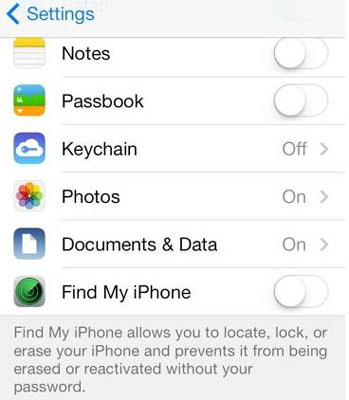
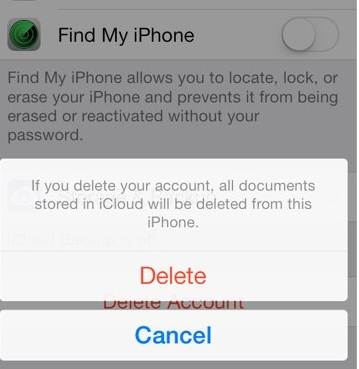
Steps to delete iCloud account on iPhone/iPad
In case you forgot iPhone password and want to remove iCloud account without password, here’s how to do it in simple steps.
- Go the Settings app and find iCloud. Tap on it to open. When prompted for a password, enter any random number. Then Tap on "Done."
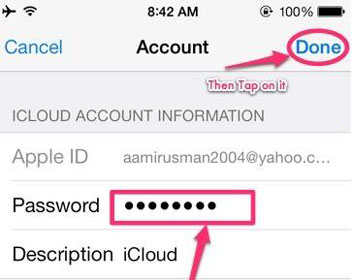
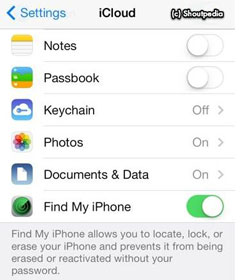
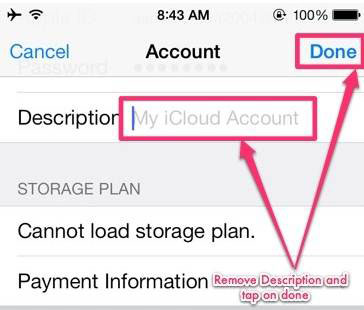
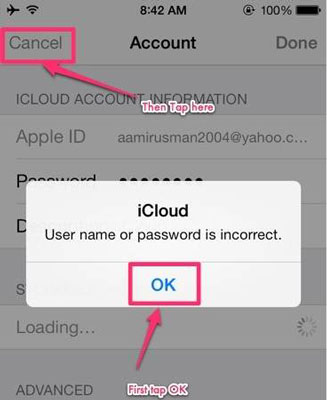
How to remove iCloud account without password on iPhone
By yuzay
MI ACCOUNT UNLOCKER 3in1 – Mi Account Unlock tool RAR Download – Are you trying to download Mi account unlocker tool? If yes! Then you have landed on right place.
These are official Mi account unlocker tool to unlock any Xiaomi Mi account and Mi cloud account.

These are official Mi account unlocker tool to unlock any Xiaomi Mi account and Mi cloud account.
Mi Account Unlock tool RAR Download – 3 In 1 Tool
Here in this 3in1 Mi account unlocker tool you will find below these three different official Mi account unlock tool
- Mi Account Unlock Tool [version 1]
- OMH Mi Account Unlocker Beta [version 2 beta]
- OMH Mi BL Unlocker Beta version 3
Here are the screenshots of all Mi account unlock tools.
Mi account unlock tool is first version for mi account bypass and factory reset. If your Mi or Xiaomi android phone is locked and also you forgotten your Mi account username and password then Download Mi Account unlock tool software to bypass mi account username and password.
- Open folder and run “miaccountunlock tool.exe” file as administrator and launch the tool on pc.
- Now boot your Xiaomi device into recovery mode and connect it with pc via USB cable.
- In the last check information and then click on “Bypass Mi Account” to bypass MI account of your Xiaomi android device.
- ALL Done!
MI ACCOUNT UNLOCKER 3in1
By yuzay
Meizu တွေ အရင်က ဖြေရင် MRT လိုပါတယ်။ခုမလိုတော့ပါ။အောက်ပါနည်းအတိုင်းလုပ်ပါ။
SP Flashtool ကို ဒီ folder ထဲ့က ဟာပဲသုံးပါ
1 Download agent မှာ DA_PL ကိုထည့်ပါ
2 Scatter မှာ model အလိုက် scatter ထည့်ပါ။
3 Authentocation file မှာ authbymmst.auth ထည့်ပါ။
ပီးရင် ခနထားပီး file ထဲ့က သက်ဆိုင်ရာscatter ကို note+++ ဖြင့် ဖွင့်ပါ
userdataကိုရှာပါ သူအောက်က
linear_start_addr နောက်က 0×61000000 ဆိုတဲ့ဟာကို copy ယူပါ။

ပီးရင် sp flash tool ရဲ့ format ကိုသွားပါ
Manual Format flash ကို ရွေးပါ။
sp flashtoolရဲ့ format မှာပါတဲ့ Being Address[HEX] နောက်မှာ ဖျက်ပီး past ချပေးပါ။
ပီးရင် scatter က partition_size နောက်က 0×c0000ကို copy ယူ sp flashtoolရဲ့ format အကွပ်ရှိ format Length[HEX] နောက်မှာ ဖျက်ပီး past ချပေးပါ။(model အလိုက် Adress တွေကွာပါမယ် ဒါက M1 Note ကို ဥပမာပြထားတာပါ။
ပီးရင် start နိပ် ဖုန်းကိုmtk mode မှာထားပီးကြိုးထိုးပါ။ရပါပီး။
တကယ်လို ဖုန်းက recovery မှာ လည်နေရင် ကျနော်ဆီက userdata လာတောင်းပါ။အကိုတိုမှာ ရှိလဲ ပြန် flashပါ။(အလုံးတိုင်းမဖြစ်ပါ)
တကယ်လို firmware မရှိလဲ userdata flash ပါ ရပါတယ်။
Flyme acc ဖြေမယ်ဆိုလဲ Firmwareကို formatall download နဲ့ရေးပါ။
ရမည်မော်ဒယ်များ M1 Note M2 M2Note M3 M3 Note M3s Note6ပါ။
note++ နဲ့ toolကို Download ယူပါ။
SP Flashtool ကို ဒီ folder ထဲ့က ဟာပဲသုံးပါ
1 Download agent မှာ DA_PL ကိုထည့်ပါ
2 Scatter မှာ model အလိုက် scatter ထည့်ပါ။
3 Authentocation file မှာ authbymmst.auth ထည့်ပါ။
 |
| အဲသုံးခု လုံးဝ မလွဲရပါ |
ပီးရင် ခနထားပီး file ထဲ့က သက်ဆိုင်ရာscatter ကို note+++ ဖြင့် ဖွင့်ပါ
userdataကိုရှာပါ သူအောက်က
linear_start_addr နောက်က 0×61000000 ဆိုတဲ့ဟာကို copy ယူပါ။
ပီးရင် sp flash tool ရဲ့ format ကိုသွားပါ
Manual Format flash ကို ရွေးပါ။
sp flashtoolရဲ့ format မှာပါတဲ့ Being Address[HEX] နောက်မှာ ဖျက်ပီး past ချပေးပါ။
ပီးရင် scatter က partition_size နောက်က 0×c0000ကို copy ယူ sp flashtoolရဲ့ format အကွပ်ရှိ format Length[HEX] နောက်မှာ ဖျက်ပီး past ချပေးပါ။(model အလိုက် Adress တွေကွာပါမယ် ဒါက M1 Note ကို ဥပမာပြထားတာပါ။
ပီးရင် start နိပ် ဖုန်းကိုmtk mode မှာထားပီးကြိုးထိုးပါ။ရပါပီး။
တကယ်လို ဖုန်းက recovery မှာ လည်နေရင် ကျနော်ဆီက userdata လာတောင်းပါ။အကိုတိုမှာ ရှိလဲ ပြန် flashပါ။(အလုံးတိုင်းမဖြစ်ပါ)
တကယ်လို firmware မရှိလဲ userdata flash ပါ ရပါတယ်။
Flyme acc ဖြေမယ်ဆိုလဲ Firmwareကို formatall download နဲ့ရေးပါ။
ရမည်မော်ဒယ်များ M1 Note M2 M2Note M3 M3 Note M3s Note6ပါ။
note++ နဲ့ toolကို Download ယူပါ။
Meizu Userlock Flyme acc acc no need box
By yuzay
Download Mi account unlock tool to bypass Mi account or to bypass mi cloud verification. Mi account unlock tool is a small pc tool which can help you to remove or unlock Mi account if it’s asking “this device may be associate with existing Mi account”. Same as you can remove or bypass Mi account after hard reset on any redmi or Xiaomi devices. Just download Mi account unlock tool to remove or bypass Xiaomi Mi account lock from your own Xiaomi Smartphone.

What To Do If I Forgotten Mi Account And Password?
If you are using any Xiaomi or redmi android phone and now after factory reset it’s asking for Mi account ID and password then you need to enter correct Mi account credentials to setup your phone. Otherwise you can apply on forget password to recover Mi cloud account credentials. But if you are getting any problem to recover new password or really don’t know what’s the correct ID then you can bypass MI cloud verification or can remove Mi account by Mi account unlock tool. Believe me it’s a simple and final method to bypass Mi cloud account without voiding phone warranty. Otherwise you have to go on MI service centre to recover your MI account locked phone.
mi account unlock tool download Here
password – ourflashfile.com
Mi Account Unlock Tool – Remove Or Bypass Mi Cloud Verification
By yuzay


Becoming a partner and making money on YouTube used to be hard. Only a select few were allowed and they were usually invited by the site, sometimes with a personal phone call. Now you can make money on YouTube just by enabling monetization in your account settings. As long as you created all of your own content, or have a license to use content that you did not (i.e royalty free music), you are almost guaranteed acceptance into YouTube’s partnership program.
It is easy to monetize YouTube videos, but it is not easy to earn money off of them. How much money you make per ad will depend on which ads are run in your videos and how much of a cut YouTube is taking. More popular videos get higher paying ads, and more popular YouTubers are able to negotiate better ‘CPM’s with YouTube. CPM means ‘cost per thousand’. YouTubers can expect to make between $0.30 and $2.50 CPM, although there is a lot of variation. If you earn $0.30 for every thousand people who click on an ad then it will take you a long time to make any significant money.
All that means is that if you are serious about turning your vlog into a source of income you have to really work at it. Create amazing content and promote your videos well; it will take a while, but your channel will start to get attention. Once your vlog starts to be successful you might be able to make some real money.
This article will walk you through enabling monetization, including linking your YouTube account with your AdSense account (both of which exist under the umbrella of your Google account). Then, there will be a walkthrough of how to monetize your videos. They will not be automatically monetized after you enable monetization.
1.Ten Steps to Monetizing Your Channel
1. Go to your Account Settings and, under Channel, select Status and features.
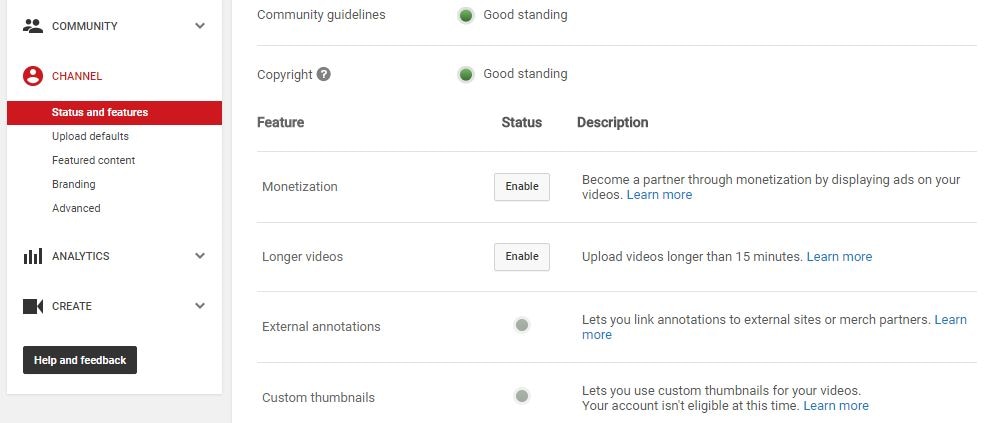
2. Click on Enable next to Monetization.
3. In the next screen, click the blue Enable my Account button.
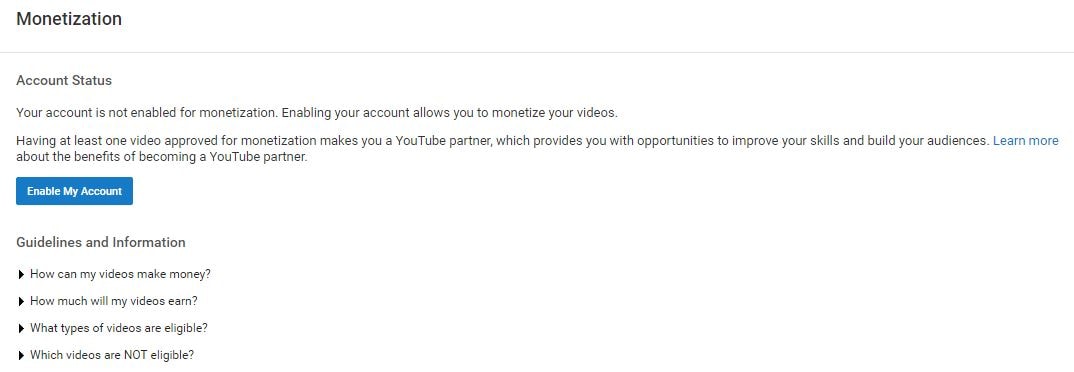
4. The YouTube Partner Program Terms will pop up. Compared to a lot of the “Terms” you are asked to read and agree to when signing up for things online the Partner Terms are fairly short and readable.
5. After reading the terms there are three boxes you will need to check to proceed. The first is to confirm that you read the Terms. The second box is a promise not to click on the ads in your own videos to try to create profits artificially.
The third box requires you to promise not monetize content that you do not own. The most extreme version of this would be stealing somebody else’s video and trying to monetize it on your channel. However, using a song or sound effect in your video you do not have the rights to also counts. There are a lot of places you can get free music to use in your monetized videos, and YouTube’s own Audio Library is one of them.
6. After you have checked all the boxes and moved on you will see a pop up explaining how to monetize your individual videos.
Your channel is now monetized, but you will not be able to earn money until you have linked your channel to your AdSense account.
7. There will be a reminder to link your channel and your AdSense account in the next screen. Click on the Link my account button. Or, go to Google.com/adsense and click Sign Up Now. Either method will take you to the Welcome to AdSense page.
8. Click Sign In to sign in to your Google account, which is the same as your YouTube account.
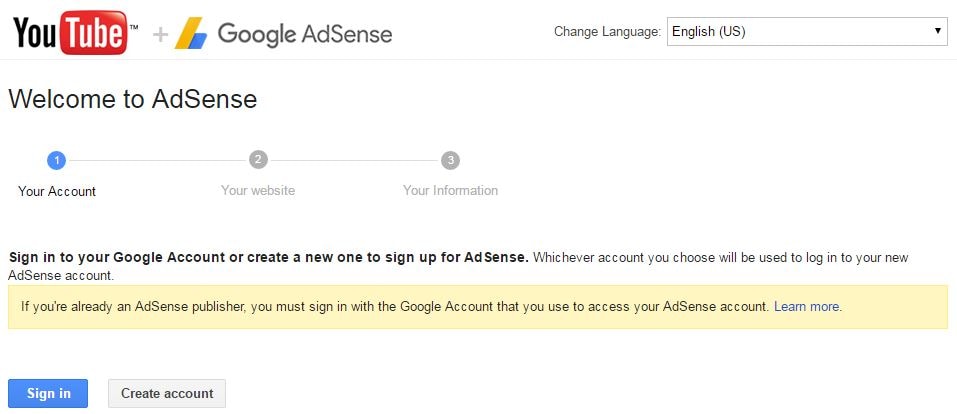
9. After you have signed in it will show you your channel url next to My website and give you a chance to change your language. Click Continue.
10. The last step is to fill out all your contact information before you submit your application. Your approval should come within two days.
2.4 Steps to Monetizing Your Videos

1. Go to your Video Manager and check the boxes next to all the videos you want to enable ads for.
2. Click on Actions and then select Monetize.
3. In the window that pops up you will be given a chance to choose what kinds of ads you want to allow in your videos. You must also specify here if you have included paid product placement in your video.
4. Wait for the review process to finish and ads to start appearing in your videos. If you are using any licensed, royalty free, content (like a music track) then YouTube may ask you to prove you have the rights to it.
How To Make Money on YouTube
By yuzay
Subscribe to:
Posts (Atom)


